Head movement · HandMeasure AR for iPhone
Head Rotations
Take a head-movement break with live face tracking. Trace clockwise or counterclockwise circles, or count nods, turns and side tilts with a wireframe guide in HandMeasure AR.
Download on the App StoreFree download · Some features require HandMeasure Pro.
How to play
In HandMeasure AR, open Head Rotations.
Set your center
Open Head Rotations in the Experimental section. On a supported iPhone or iPad, allow camera access, keep your phone steady and look straight ahead. Tap Calibrate center before moving.
Go around the clock
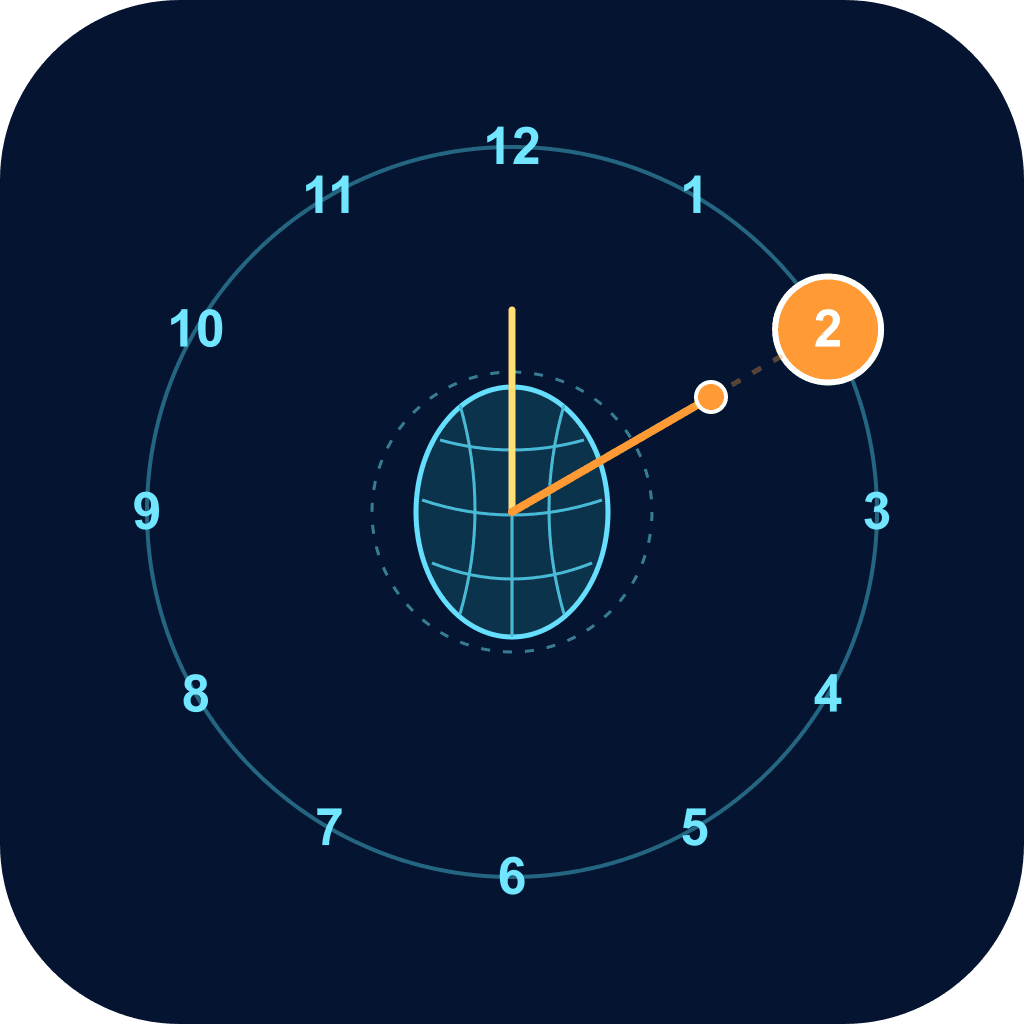
Look slightly up to reach 12 o’clock, then trace a small, comfortable circle with your nose. Finish at 12 to count a clockwise or counterclockwise rotation. The progress ring shows how far you have gone.
Try nods, turns and tilts
Nod down, turn left or right, or gently bring an ear toward a shoulder. Return to your calibrated center and pause briefly to count the movement. Each movement has its own total.
Read the wireframe
The yellow ray shows your face’s own up direction. The orange line runs from your nose toward the movement dot, with a faint dashed continuation beyond it. Switch between wireframe, abstract head and clock-only views.
Reset or explore
Reset all counts is below the counters and asks for confirmation. Touch demo, in More options, lets you explore circular movements without face tracking. Live tracking stays on your device; camera video is hidden and isn’t recorded. Use comfortable movements and stop if uncomfortable.