Head movement · HandMeasure AR for iPhone
Head O’Clock
Your head is the controller. Follow a number from 1 to 12, move from center toward its position on the clock, hold briefly and return to center for the next target.
Download on the App StoreFree download · Some features require HandMeasure Pro.
How to play
In HandMeasure AR, open Head O’Clock.
Set center & start
Open Head O’Clock in the Experimental section, just after Head Rotations. Keep your phone steady, allow camera access and look straight ahead. When your face is found, tap Set center & start to save that neutral position.
Find the highlighted number
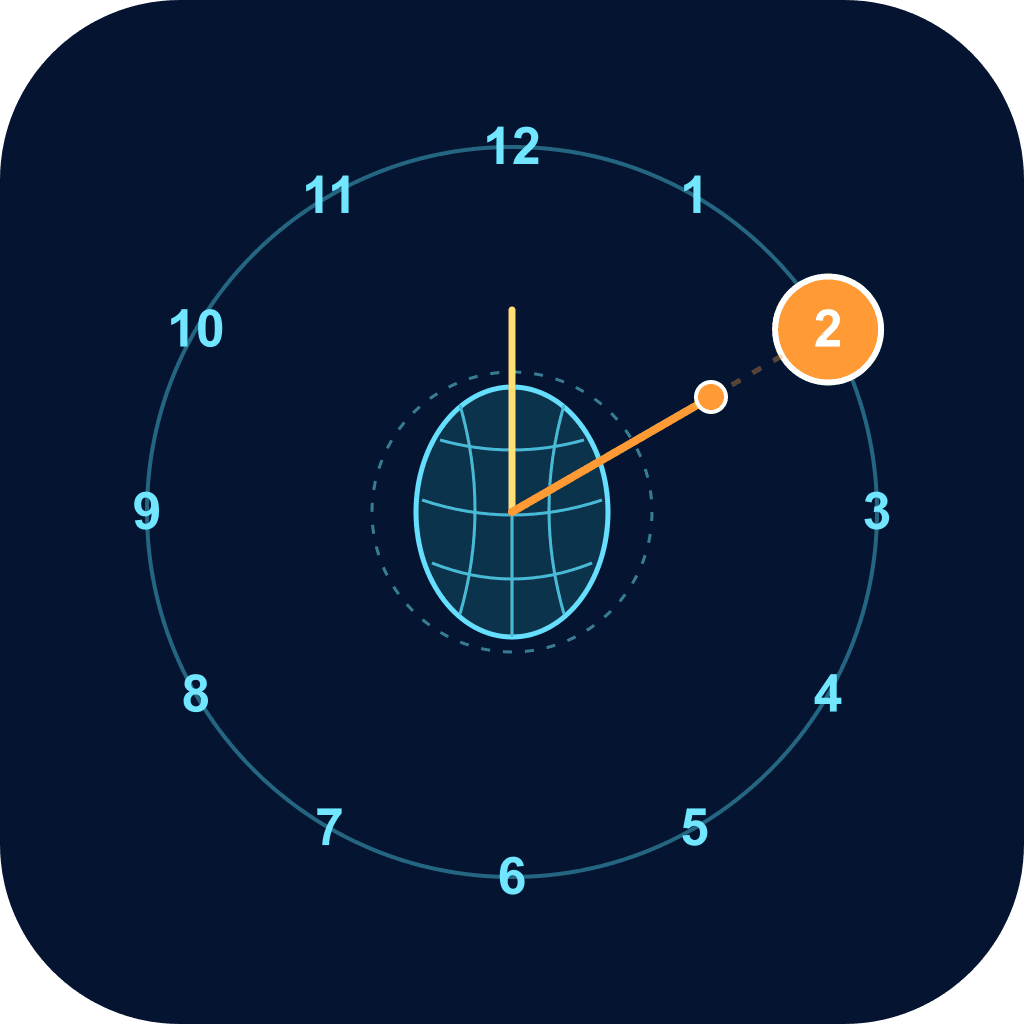
The prompt and the orange-highlighted clock number show your target. Point your nose toward that position, using a small, comfortable movement. For example, 12 is up and 3 is to the right on the screen.
Hold, then return
Hold the target direction for about half a second to score a hit. Return the dot to the large center zone and pause briefly before the next target. The forgiving target zones do not require an exact angle.
Follow the face guides
The wireframe follows your face. The orange direction line runs from the nose through the dot, then becomes faint and dashed toward the clock rim. The yellow line shows the face’s own up direction.
Try it without a camera
Turn on Touch demo to drag toward the highlighted number and release to return to center. Live play requires a device that supports face tracking. Camera tracking stays on your device and video isn’t recorded. Use Recenter if your comfortable starting position changes.